Skip to content
iCode

Loading

Product

Features that feel inevitable

Ten innovation pillars—each one a reason iCode is a coding academic OS, not another quiz tool with a compiler glued on.

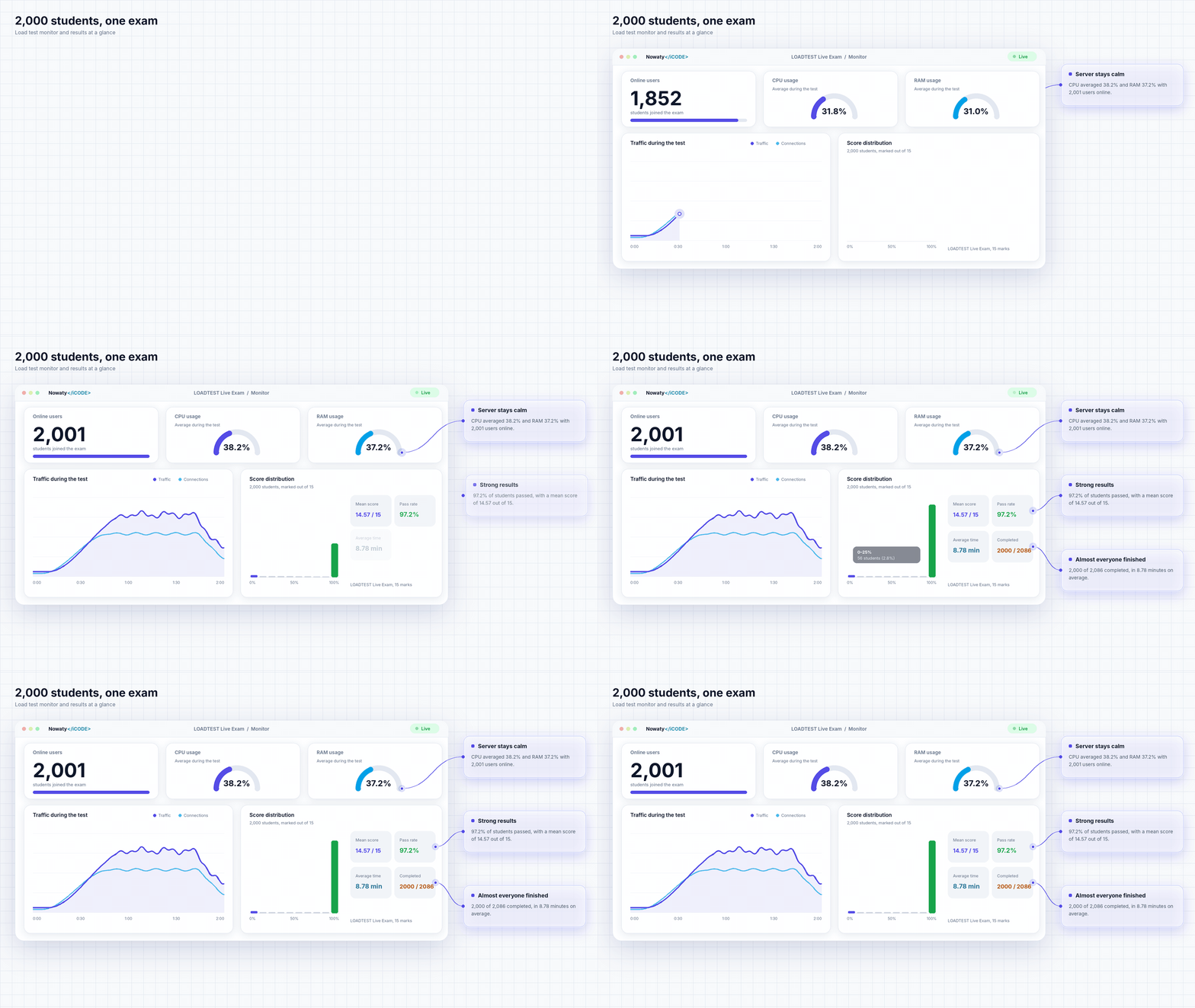
Load test of a campus exam under concurrent students
01/15

It is owned by the person who had to grade the course, and it is engineered by the same hands: compilers, papers, practice, and the exam day a real faculty actually faces.

Teach, practice, examine, grade, and operate in one self-hosted surface—not an LTI bolt-on or generic quiz CBT.

  • iCode is built as a single academic OS for coding courses: materials, practice, exams, grading evidence, messaging, and institutional ops share one login, one course chrome, and one permission model.
  • Students move from week content to ConnectExercise practice to timed papers without jumping between a CMS, a compiler lab, and a separate CBT tool.
  • Staff author once and reuse across exercises, exams, and the question bank—same languages, cases, and CLO tags everywhere the item appears.
  • Self-hosting keeps compilers, submissions, and student data under campus control instead of bolting a third-party quiz engine onto an LMS via LTI.
  • Roles stay explicit—students, teachers, coordinators, supervisors, viewers, and admins—so high-stakes workflows do not leak into casual practice or peer chat.

Week-by-week sections with Content, Collapsible Content, Files, Folders, Links, Edit Mode, publish controls, and Trash.

  • The Course tab is the week workspace: each section mixes Content, Collapsible Content, Files, Folders, Links, and ConnectExercise in one order students actually follow.
  • Edit Mode is off by default and remembered for the browser tab. Managers see the student list until they turn authoring chrome on.
  • A section and each resource publish separately. Students need both switches on, so drafts can sit in the week without leaking.
  • Rich text includes MathJax, YouTube, and tables. PDFs open in the built-in viewer. Managers can copy a raw file URL for teaching datasets.
  • Soft-delete sends sections, files, exams, announcements, and enrols to course Trash, with restore before anything is purged.

Practice uses the same compilers and auto-graded question types as high-stakes exams; practice marks stay off Grades/CLOs.

  • ConnectExercise runs the same compilers, editors, and auto-graded types as the exam player. There is no timer, no paste lock, and no second-exam block.
  • An exercise holds many questions. Long-answer and file-submit stay on exams; practice is the auto-graded set, including multi-file code.
  • Students start from the teacher’s starter code, Run sample cases, and Save one answer per question. Key solutions stay hidden until the teacher publishes them for that exercise.
  • Those marks are for the learner and the teacher. They never enter the Grades tab or course CLO weights.
  • Staff open class Responses from the course, sort by name or mark, and preview one student’s player without leaving the week.

14+ languages with weighted test cases, output normalization, similarity options, and sample runs for students.

  • The authoring list is 14 language keys: C, C++, Python, Java, C#, VB.NET, PHP, Dart, R, NASM32, NASM64, MIPS, HTML, and JavaScript. HTML and JavaScript grade in the browser; the others compile on the server.
  • Each case has a weight, expected output, and optional ignore-case, ignore-spaces, and ignore-lines. A weight of 0 is a sample run that does not score.
  • Generate Cases can mark the first runs as samples and split the remaining weight across the hidden cases. Substring checks cover noisy HTML and JavaScript output.
  • Students may add and rename extra editor files. Optional input and output hints sit under the stem without revealing the key.
  • The same case set is authored once for the bank, the exam, and ConnectExercise, with CLO tags and keywords traveling on import.

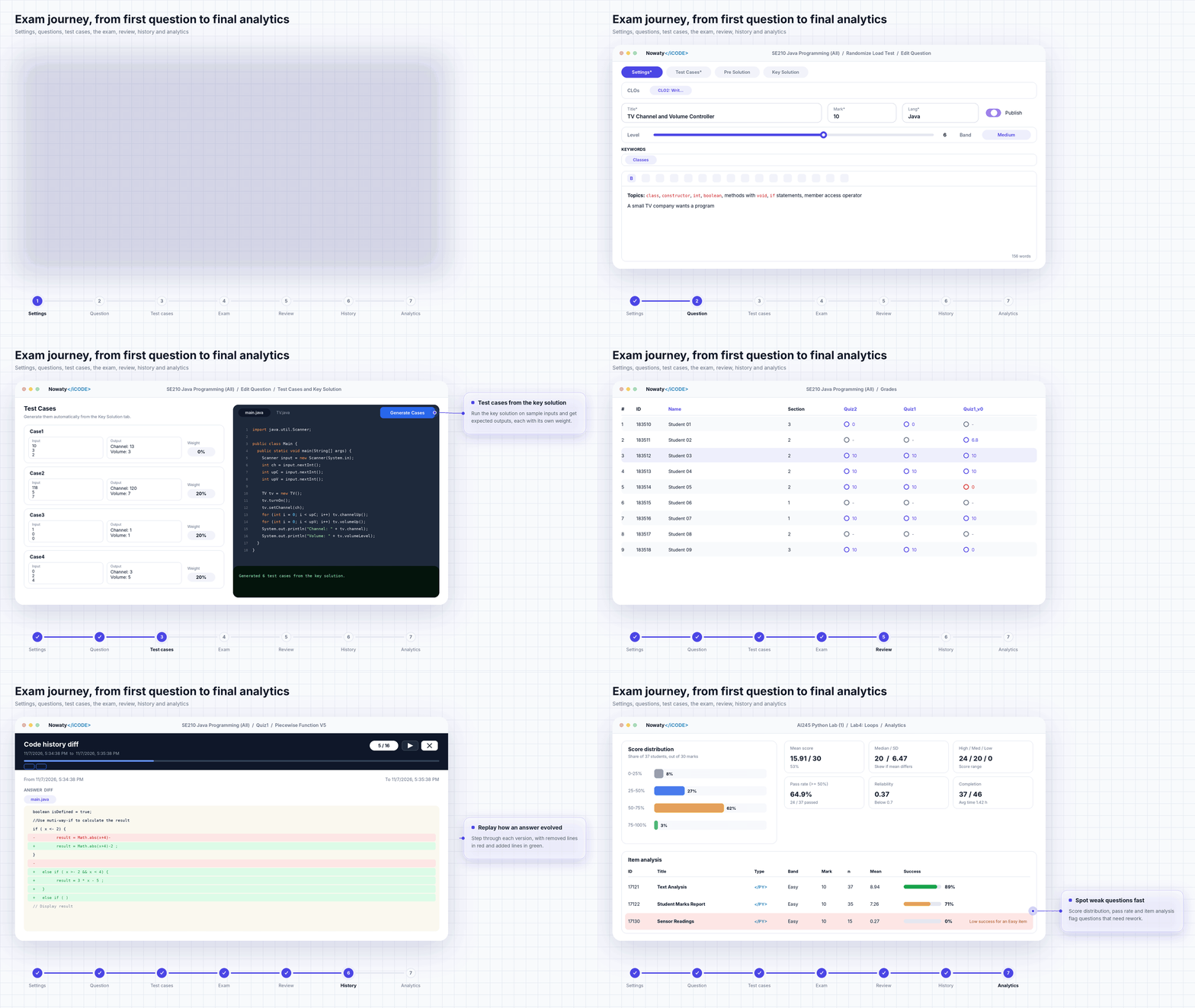
Classic, mixed, and randomized papers from the question bank, with live settings, CLO tagging, and Exam Analytics.

  • A paper can be classic, fully randomized, or mixed. Randomized slots draw from the bank; fixed questions stay on every paper. The first draw is reused on later attempts.
  • Scoring uses the exam slot mark, not the bank item’s mark, so two students who drew different questions are still graded on the same points.
  • While a sitting is live, staff can extend the end time and change paste, leave, password, IP, and attempt limits. The randomize pool locks once anyone has a draw.
  • Students on a randomized paper see “Question N”. Staff still see the real title. Adding a classic question mid-exam can append it; pool copies do not flood other papers.
  • Exam Analytics shows pool health, sample draws, score bands, and per-slot item analysis, including choice breakdowns for objective types.

Paste/leave/password/IP gates, auto-save history, code-diff review, and supervisor workflows for fair overrides.

  • Each exam can require a password, an IP range, an allow-list of enrolments, shuffled order, or one-way navigation. Paste and leave can be turned off, including while the exam is already open.
  • A student can be in only one exam at a time. Practice does not take that lock, so labs stay open on exam day.
  • Code auto-save keeps a history beside the official Save. Finish, Results, Grades, and the finish screen all use that combined record, so a never-reopened question still counts.
  • Results open a code-history slideshow and per-case marks. Correct All recompiles drawn auto-graded code. Supervisors may override a mark; they cannot run Correct All or open Attempts.
  • Similarity pairs are stored for code submissions so a review starts from evidence, not a hunch.

Staff↔learner DMs, section Groups, reactions, forward, and attachments—without student↔student private chat.

  • Inbox is a course-scoped chat: direct messages, replies, nine reactions, forward, and read receipts. Staff can attach files; students receive them.
  • Teachers, coordinators, and supervisors create section Groups and can lock member compose during an exam. Viewers can be members; they cannot manage a group.
  • Students message staff who share their courses. Student-to-student private chat is rejected. A campus setting can disable the student composer and leave staff free to write.
  • The messages bell counts unread threads and reactions on your own messages, and it stays quiet for a thread you already have open.
  • Edit lasts 15 minutes. Unsend is available on your own messages; restore is a short window, and attached files are not restored.

Course notices plus public announcements with role × course × section audience controls and a header bell.

  • Course announcements belong to one offering. Public announcements are a second channel with three axes: enrolment role, course, and section.
  • Site staff may post to every role, including a site-wide notice. Coordinators reach teachers, supervisors, students, and viewers on courses they coordinate. Teachers reach supervisors, students, and viewers on sections they teach.
  • Supervisors and viewers read posts aimed at their role. They do not compose. A teacher does not see a public post that excluded teachers.
  • The header bell merges announcements with grading notices. Posters also manage the public list, with Trash and a retention window after the end date.
  • The same rich editor used in materials — math, images, allowlisted YouTube — is available on both channels.

Question banks, import/export (including Word for code questions), CLO tagging, and a shared Grades pipeline.

  • The bank stores reusable items with course keywords, difficulty band, and CLO tags. Filters and sort stay put while you create, import, or delete.
  • Import and export move iCode zip packs — and plain JSON text — among the bank, exams, and exercises. A code question can also download as a Word document with stem, cases, and CLOs.
  • Exam CLO tags feed course outcome reports. The same tags on a practice question are for authoring and transfer only; they do not change CLO weights.
  • A randomize slot matches type, band, and — for code — auto-grading, and it requires the bank item’s keywords and CLOs to cover the slot. Marks are ignored when matching and applied from the exam when scoring.
  • Exclusions are a block list, so a new matching bank question joins the pool until someone excludes it. A second exam starts with a full pool of its own.

Bulk Excel enrol, soft-delete Trash, Analytics + Live Monitor, light/dark theme, and installable PWA.

  • Admins enrol from Excel, with a sample sheet, and unenrol is a soft delete until Trash purge.
  • Dashboard Analytics caches platform KPIs — courses, exams, exercises, questions, banks, messages — beside Chart.js trends. Live Monitor polls host, database, and this app on a short window with pause.
  • The sidebar shows who is online, which exams and exercises are open, and how deep the compile queues are, next to CPU, memory, and disk.
  • Light and dark follow a site cookie, including the exam player. The campus host installs as a PWA with its own icon and splash.
  • The self-hosted .NET application, MariaDB, and compilers stay on campus infrastructure, so submissions and exam-day response stay with the institution.

Deep cuts

Where the product earns trust

Coding question craft

Weighted cases, auto-generation helpers, normalization, CLO tags—authored once, reused across exams, exercises, and the bank.

  • Multi-file layouts for HTML/JS and OOP
  • Sample runs students can trust before submit
  • Shared authoring with practice and exams
Code questions guide
Coding question case auto generation settings

Bank import & a fair randomize slot

Flag a question, match the bank, and every student is scored on the exam slot mark — the same mark, whichever item they drew. The first draw is kept for later attempts.

  • Pool badge: thin pools in red, healthy pools in green
  • New bank matches join until a teacher excludes them
  • Once draws exist, the pool is view-only until the sitting ends
Import / randomize
Import from questions bank into an exam

Analytics that tell a story

Classic and randomized exam analytics, plus institutional dashboards for semester review.

  • Classic and randomized exam views
  • Live Monitor for exam-day ops
  • Semester-scale institutional dashboards
Analytics & monitor
Analytics dashboard for exams and exercises

Inbox with academic boundaries

Staff and learners share a familiar chat — reactions, replies, forward, and staff files — inside course scope. Students cannot open a private thread with each other.

  • Teachers, coordinators, and supervisors run section Groups
  • Viewers can be messaged; they do not manage Groups
  • A campus switch can disable the student composer without silencing staff
Inbox & Groups
iCode Inbox with a staff and learner conversation

The case for iCode

Why choose iCode

iCode gives institutions one platform for the whole semester, with the programming depth a generic LMS lacks.

  1. One platform instead of many

    Materials, practice, exams, grading, messaging, announcements, analytics and monitoring share one login, one course workspace and one permission model. Students never switch between a notes site, a compiler lab and a quiz tool.

  2. Coding-native assessment

    Multi-language compile-and-run, weighted test cases and multi-file answers across 14 languages. Practice and high-stakes exams use the same compilers and grading rules.

  3. Faster, fairer grading

    Results appear in milliseconds instead of a week of manual compiling. Instructors keep override and bulk regrading, so automation never removes academic judgment.

  4. Integrity and evidence built in

    Paste, navigation, password and IP controls, one exam session per student, auto-saved code history with diff review, and stored similarity pairs.

  5. Complete LMS capabilities

    Nine question types, bulk Excel enrolment, six roles, CLO tagging, reusable question banks, two announcement channels and a staff-learner Inbox.

  6. Full visibility

    The Analytics dashboard and Live Monitor show platform KPIs, exam analytics, online users, running exams and compiler queues before load becomes a problem.

  7. Institutional control

    Self-hosted on campus infrastructure, so submissions and student data stay with the institution. Soft-delete Trash and audit trails protect against accidental loss.

  8. Proven at scale

    In production at the IT College of JUST, with 8.5k enrolled students, 1.5k exams and 3k+ coding questions per semester.

  9. Built by the person who grades

    Created by a lecturer who needed it for a 500-student C++ course, and shaped by real exam-day needs rather than a demo.

Next step

Bring iCode to your campus

A complete LMS built coding-first—materials, practice, exams, grading, messaging and live monitoring in one platform.

Self-hosted · Institutional licensing · Proven at JUST